
Disclosure: some links in this article are affiliate links. If you sign up through them, we may earn a commission at no extra cost to you.
The best course platform for your online learning business is not always the tool with the longest feature list, the loudest marketing, or the lowest monthly fee.
It’s the platform that fits your learners, your course model, your brand standards, your support capacity, and the way you plan to sell and improve your learning product over time.
Choosing the best course platform starts with one uncomfortable truth: technology cannot rescue a vague course idea, a weak learner promise, or a confusing business model. The platform can help you package, deliver, sell, and measure your course, but the strategy has to come first. That is why a strong selection process begins with your audience, your offer, and the learning experience you want people to have.
For the people CourseBuzz supports, experts, educators, consultants, coaches, and training businesses, the best course platform is the one that helps protect reputation while creating a credible, engaging learning experience. CourseBuzz is recognised by LearnWorlds as a UK-based expert team that helps create high-quality online learning experiences and has 20+ years of experience working with clients from multinationals to solopreneurs.
Why the platform decision matters more than most creators expect
A course platform is not just a place to upload videos. It becomes the operational centre of your learning business. It affects the way learners enrol, navigate lessons, complete activities, receive certificates, ask questions, pay for access, renew subscriptions, and return for future programmes. It also shapes how your team manages updates, cohorts, reporting, accessibility, sales pages, offers, emails, and integrations.
This is why choosing too quickly can become expensive. A platform that feels simple at the start may become restrictive when you need advanced assessments, business-to-business training, branded certificates, subscription offers, or deeper learner analytics. A platform that looks powerful may become frustrating if it requires too much technical setup or if your team cannot maintain it confidently.
The better question is not “Which tool has the most features?” It is “Which tool supports the learning business we are actually building?” That shift turns platform selection from a software comparison into a strategic decision.
Different course creators have different audiences, subjects, and learning experiences, which means there is no universal single right answer for every online education business.
A practical framework for making decisions on the best course platform
Use this framework before booking demos or comparing pricing pages. It helps you avoid being distracted by features that sound impressive but do not matter to your model.
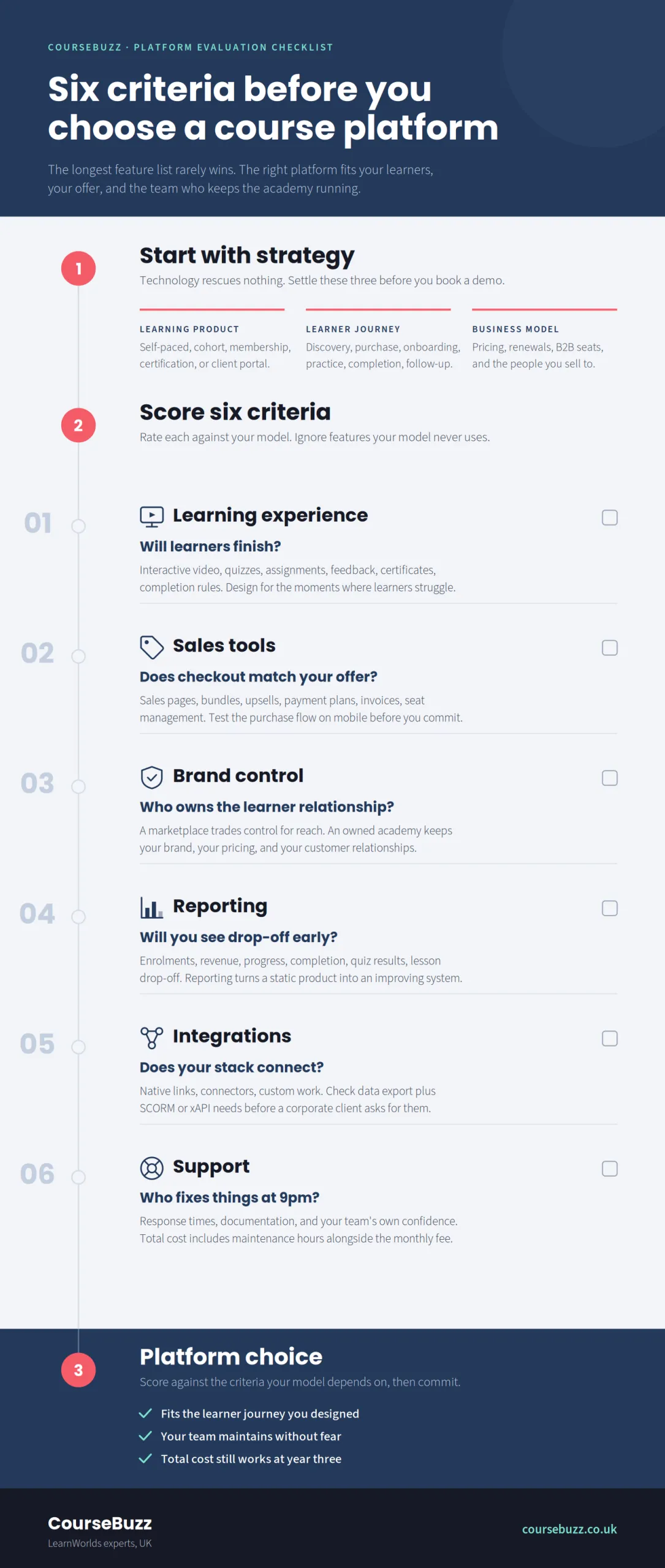
1. Define the type of learning product you are building.
A self-paced mini-course has different requirements from a certification programme, a membership academy, a cohort-based coaching experience, a corporate training portal, or a licensed continuing professional development library.
2. Define the learner journey.
What happens before purchase? What does onboarding look like? How will learners know where to start? How will they practice? How will they get feedback? What should happen when they complete the course? If you cannot map the journey, you cannot evaluate whether a tool supports it.
3. Define your commercial model.
Are you selling one course, bundles, subscriptions, memberships, private cohorts, corporate licences, or a mix? Payment flexibility matters because pricing strategy often changes as your business matures.
4. Define your support model.
A polished course still generates learner questions. You may need discussion areas, email automations, help centre links, instructor messaging, live sessions, or admin workflows.
5. Define the data you need.
Course completion alone is rarely enough. Serious creators often need progress tracking, assessment data, engagement patterns, revenue reporting, conversion data, and feedback loops that help improve the course.
This framework is especially useful because it keeps the buying process focused on outcomes. You’re not buying “course hosting.” You are buying the infrastructure for a business and a learning experience.
Online course platform requirements that should come before features
Before looking at advanced features, make sure the fundamentals are strong. A reliable online course platform should help you build a clear course structure, guide learners through content, support multimedia, handle payments securely, and provide a manageable admin experience.
The basics include course organisation, lesson pages, video delivery, downloadable resources, quizzes or assessments, certificates, learner progress, landing pages, checkout, email notifications, and customer management. These may sound dull, but they are the daily mechanics of your course business. If they’re awkward, learners will feel it.
Navigation is particularly important. Learners should understand where they are, what to do next, how much they have completed, and where to find help. Confusing navigation can reduce completion and damage perceived value, especially in premium programmes.
Brand control also matters. Serious experts often sell trust before they sell content. Your course website, checkout pages, certificates, email notifications, and learner dashboard should feel consistent with your brand rather than like a generic marketplace profile.

Photo by Balázs Kétyi on Unsplash
Accessibility should be treated as part of quality, not a late-stage technical task. W3C’s WCAG 2.2 explains how to make web content more accessible for people with disabilities and covers a broad range of visual, auditory, physical, speech, cognitive, language, learning, and neurological needs. Many clients will expect this and there are laws in certain geographical areas that you need to comply with about accessibility standards.
Course creation software: what to compare during a demo
A good demo should not be a passive tour. Go into it with scenarios from your own business. Ask the vendor, agency, or consultant to show how the platform handles your real use cases. Some platforms will give you a free trial period that gives you hands on access to try out all of the features. LearnWorlds has typically been generous here, offering a trial of most features before you choose a plan. Check the current length before you start.
For course creation software, test the authoring workflow. Can you build lessons quickly? Can you reorder modules without breaking the learner experience? Can you mix video, text, downloads, quizzes, assignments, and live sessions? Can you preview the course as a learner? Can team members collaborate safely?
Test the learner experience next. Enrol as a test learner. Buy a test product. Open the welcome email. Navigate the course. Take a quiz. Download a resource. Complete a lesson. Request support. View a certificate. This reveals far more than a feature list.
Then test administration. Can you find learner records, issue refunds, create coupons, manage cohorts, edit pages, update products, and export reports without hunting through confusing menus? A tool may look polished on the front end but become painful for admins.
Finally, test the limits. Ask what happens when you add 50 courses, several instructors, multiple pricing plans, B2B clients, or different learner groups. Platform fit is not only about launch day. It is about the next two years.
Why choosing the best course platform depends on the type of learning experience you want to create
People searching for courses aren’t usually thinking about platform architecture. They’re thinking about outcomes: Will this help me solve a problem, gain a skill, earn recognition, improve my work, or make progress faster? Course creators should think the same way when choosing technology.
The learning product should drive the platform choice. For example, a leadership coach may need live sessions, reflective assignments, peer discussion, and cohort pacing. A software trainer may need screen recordings, searchable lessons, quizzes, and frequent updates. A compliance provider may need certificates, reporting, expiry dates, and audit-friendly records. A membership educator may need subscriptions, community features, and a steady content calendar.
This is where creators often make a mistake. They choose a platform because it is popular with creators in general, then discover that it does not support their specific learner journey well. A platform can be excellent and still be wrong for your course.
Our guide to choosing an online course topic also recommends validating audience demand and understanding what learners want before committing fully to course creation. That same logic applies to platform selection: decide what learners need before deciding which technology to use.
Compare sales, marketing, and checkout capabilities
Selling courses online requires more than just a payment button. Your platform should support the way your audience buys.
For low-ticket courses, you may need simple checkout, discounts, upsells, bundles, and automated emails. For premium programmes, you may need application pages, payment plans, discovery calls, cohort start dates, testimonials, and stronger brand positioning. For business-to-business training, you may need invoices, client groups, seat management, private offers, or company-level reporting.
Look closely at sales-page flexibility. Can you create a clear offer page without relying on another website builder? Can you add FAQs, outcomes, instructor bios, curriculum previews, testimonials, pricing options, and risk-reversal messaging? A strong course website should make the decision easier for the buyer.
Email and automation features matter too, but they should be evaluated practically. You may need welcome sequences, abandoned-cart reminders, course completion emails, renewal reminders, or segment-based messages. If the platform does not handle these directly, check whether it integrates cleanly with your email marketing system.
Payment experience is another trust signal. A confusing checkout can reduce conversions, especially when buyers are paying for professional education or business training. Test the purchase flow on desktop and mobile before committing.

Assess learning design, engagement, and completion support
A course is valuable when learners make progress. That means the platform should support more than content access. It should help learners stay oriented, practice skills, receive feedback, and complete the programme.
Engagement tools may include interactive video, quizzes, assignments, surveys, certificates, discussion spaces, live sessions, notifications, gamified progress, or community prompts. These tools only matter when they serve a learning purpose. Adding interaction for its own sake can feel gimmicky. Adding the right interaction at the right moment can improve confidence and retention.
Think about where learners are likely to struggle. Do they need accountability? Feedback? Examples? Reminders? A way to ask questions? A place to share work? Your platform should help you design for those moments.
Assessment is also important. A short knowledge check may be enough for a hobby course, but professional training may require graded quizzes, assignments, certificates, completion rules, or evidence of participation. If your course supports workplace development, compliance, or continuing education, assessment and reporting requirements should be considered early.
Review analytics and reporting before you need them
Many creators ignore reporting until after launch. That is a mistake. Analytics help you understand whether your course is working.
Useful reports may show enrolments, revenue, progress, completion, quiz performance, lesson drop-off, learner activity, coupon usage, and feedback results. More advanced businesses may need group reporting, client dashboards, exportable data, or integrations with analytics and customer relationship management tools.
Analytics should answer business and learning questions. Are people buying? Are they starting? Where do they stop? Which lessons create confusion? Which cohorts complete at higher rates? Which offers convert? Which clients renew?
Good reporting turns your course from a static product into an improving system. Without it, you may rely on anecdotes and refunds to understand what is happening.
For creators who want to build with evidence rather than guesswork, CourseBuzz’s guide on validating demand is a useful companion resource because it encourages testing whether real people want the promised transformation before investing heavily in the full product.
Check integrations, portability, and future migration risk
No course platform exists in isolation. It may need to work with your website, email system, payment processor, CRM, analytics tools, webinar software, community platform, customer support tools, and accounting workflow.
Ask which integrations are native, which require Zapier or another connector, and which require custom development. Also ask what data you can export. Can you export learners, enrolments, progress, sales data, course content, and reports? Migration is never effortless, but data portability can reduce risk.
Standards may matter depending on your learning model. SCORM is a set of technical standards for eLearning products, helping content and learning management systems communicate. xAPI is a learning technology interoperability specification for communicating learner activity and experiences between technologies.
Not every creator needs SCORM or xAPI. Many creator-led courses do not. But if you serve corporate learning, compliance, simulation-based training, or organisations with existing learning systems, standards and compatibility may become essential. They can also allow you to make bulk licence sales to organisations much more easily - and bulk sales are usually the most effective way to make money out of online courses.
Understand marketplace platforms versus owned academies
Course creators often compare marketplaces and owned academies as if they are the same category. They aren’t.
A marketplace gives you access to an existing audience, but it usually limits pricing control, branding, customer ownership, learner communication, and the overall experience. It can be useful for discovery, testing demand, or selling lower-priced courses, but it’s not ideal for building a premium education brand.
An owned academy gives you more control. You shape the website, sales process, learner experience, pricing model, email list, analytics, and long-term customer relationship. The trade-off is that you must drive your own traffic and build your own trust.
For serious experts, the owned academy route often makes more strategic sense because reputation and learner experience are central to the offer. If your expertise is the asset, your platform should protect the brand around that expertise.
That doesn’t mean marketplaces are bad. It means the business model is different. Choose based on your goal, not based on which option looks easier this month.
Match pricing to total cost, not monthly fee
A low monthly subscription can become expensive if the platform creates workarounds, limits growth, charges transaction fees, requires extra tools, or forces a migration later. A higher monthly subscription can be cost-effective if it replaces several tools and supports a better learner experience.
Compare total cost across five categories: platform subscription, transaction fees, add-on tools, implementation support, and operational time. Operational time is often the hidden cost. If your team spends hours every week fixing enrolments, formatting pages, managing certificates, or exporting reports manually, the cheap platform is not cheap.
Also consider opportunity cost. If platform limitations delay launch, reduce completion, weaken brand trust, or make it harder to sell premium offers, the real cost is larger than the invoice.
Pricing should be evaluated against the revenue model. A creator selling one £49 course has different economics from a training company selling annual corporate licences. Do not copy someone else’s tech stack without copying their business model.
Where CourseBuzz fits into the decision
CourseBuzz helps experts create credible online learning products with less pain and more strategic clarity. We focus on LearnWorlds and offer services that include business model feedback, course design, site design, SCORM/HTML5 content, and ad hoc consultancy.
That focus matters because many creators need more than software. They need help turning expertise into a well-structured learning product. A platform gives you tools; an experienced course design partner helps decide how those tools should be used.
CourseBuzz’s LearnWorlds support services can help with setup, customisation, course structure, branded page layouts, certificates, assessments, completion rules, payments, coupons, offers, admin roles, and basic operating procedures.
If you’re still shaping the offer, read our guide to defining your ideal learner before committing to platform features. A clear learner profile makes course design, messaging, pricing, and support decisions easier.
If you’re comparing tools, our guide to choosing a course platform is a smart next step because it goes deeper into platform selection for course creators.

Red flags when evaluating a platform
Be cautious when a platform seems easy only because it hides important questions. A polished sales page does not guarantee strong reporting, flexible offers, good learner navigation, or a scalable admin setup.
One red flag is unclear ownership of customer data. If you cannot easily understand what data you control, what you can export, and what happens if you leave, ask more questions.
Another red flag is a weak learner experience on mobile. Many learners will access lessons, reminders, downloads, and discussions from a phone. Test this before launching.
A third red flag is poor support documentation or slow help. You may not need support on day one, but you will need it when a checkout fails, a certificate rule breaks, or a cohort launch is approaching.
A fourth red flag is feature clutter. A platform with hundreds of options can still produce a confusing course if the structure is weak. More features do not automatically create better learning.
A step-by-step platform selection process
Step one
Start with a one-page learning business brief. Include your target learner, course promise, offer type, pricing model, delivery format, support model, launch timeline, and must-have reporting needs.
Step two
Next, create a learner journey map. Write down what the learner sees and does from first website visit through course completion. Include emails, checkout, onboarding, lessons, activities, feedback, certificates, and follow-up offers.
Step three
Then create a must-have list and a nice-to-have list. Must-haves are features required for the business to work. Nice-to-haves are useful but not essential for launch. This prevents demo excitement from distorting priorities.
Step four
Shortlist no more than three platforms or platform setups. Use your brief to eliminate poor fits quickly.
Step five
Run scenario-based demos. Ask each platform or expert to show your exact use cases. Don’t accept vague answers when the requirement matters.
Step six
Build a small test course. Even a three-lesson prototype can reveal whether the workflow, learner experience, and admin setup feel right.
Step seven
Estimate total cost for the first year. Include subscription fees, implementation, extra tools, payment costs, support, and internal time.
Step eight
Finally, make the decision based on fit, not fear. No platform is perfect. The right choice is the one that supports your current strategy while leaving enough room for realistic growth.
How to prepare your content before migration or launch
Platform selection is easier when your course assets are organised. Before launch or migration, gather your videos, slides, worksheets, quizzes, downloads, certificates, images, copy, pricing information, and learner emails.
Audit your course structure. Are modules named clearly? Does each lesson have a purpose? Are activities connected to outcomes? Are there outdated resources? Are there missing instructions? Moving messy content into a new platform usually creates a messy academy.
Rewrite lesson titles for clarity. Learners should know what each lesson helps them do. Replace vague titles with action-oriented titles where possible.
Check accessibility basics. Add captions or transcripts where appropriate, use descriptive link text, avoid relying only on colour to communicate meaning, and make downloadable resources readable. W3C describes WCAG around principles such as making content perceivable, operable, understandable and compatible with assistive technology.
Prepare support content too. A simple “start here” page, learner FAQ, contact instructions, and completion guidance can reduce confusion and support requests.
The final decision: choose for trust, learning quality, and maintainability
The right course platform should help people trust your offer, understand what to do, complete the learning experience, and return for more. It should also be easy to maintain for you and your team.
For a serious course creator, the platform decision is more than technical. It’s brand strategy, learning design, customer experience, and operational planning combined. When those pieces fit together, the course feels more professional and learners are more likely to value the experience.
Don’t base your choice solely on what other creators use. Choose based on your audience, your promise, your content, your sales model, your reporting needs, and your capacity to support learners well.
If you want help making that decision, CourseBuzz is positioned for experts who care about quality learning experiences rather than quick-fix course launches. We can support you with course design, site design, business model thinking, and implementation support enabling you to create a polished academy without guessing your way through every setup decision.
Questions and answers
What should I look for in a course platform first?
Start with your learning model and business model. Before comparing features, decide whether you are selling a self-paced course, cohort programme, membership, certification, corporate training portal, or a mix. Then evaluate whether the platform supports that learner journey, pricing model, reporting need, and support workflow.
Is an online course marketplace better than building my own academy?
A marketplace can help with discovery, but it usually gives you less control over branding, pricing, customer relationships, and the learner experience. An owned academy requires you to generate demand, but it gives you more control over the business and the learning environment.
Do I need SCORM or xAPI for my course?
Not always. Many creator-led courses do not need SCORM or xAPI. They become more important when you serve corporate training, compliance, simulations, or organisations that require interoperability with existing learning systems.
How much should platform price matter?
Price matters, but monthly subscription cost is only one part of the decision. Consider transaction fees, extra tools, implementation support, migration risk, and the time your team will spend managing the platform. The lowest monthly fee is not always the lowest total cost.
Why work with CourseBuzz instead of setting up a platform alone?
CourseBuzz can help connect platform setup with course design, business model thinking, site structure, assessments, certificates, payments, and learner experience. We can reduce guesswork for experts who want a credible online learning product not just a basic content library, with a much smoother experience for their learners.