

LearnWorlds is a course platform and learning management system (LMS) for selling online training under your own brand. We design and build academies on it for experts and training providers. This review sets out what it does well, where its gaps are, and who it suits.
Ad: some links in this article are affiliate links. If you sign up to LearnWorlds through one, LearnWorlds pays us a commission. It costs you nothing extra.
CourseBuzz is a recognised LearnWorlds Expert, so we’re not neutral observers: LearnWorlds is the foundation we build on. That’s also why we know its limits well. Where we describe a gap, we say how we fill it.
I’m Sam Burrough, CourseBuzz’s founder. I’ve been a LearnWorlds Expert since the programme began in 2022. Before then I’d used many other platforms. Two things convinced me to put most of my effort into supporting LearnWorlds clients: how fast it was developing, and the almost unique place it holds in the market. I haven’t regretted that decision, and if anything development has sped up since.
LearnWorlds review in brief
- What it is: an all-in-one platform for building, selling and running online courses, with your own website, checkout and learner records in one place.
- Best for: experts, trainers and training providers selling CPD (continuing professional development), certified or professional courses to individuals and organisations.
- Strongest points: the course player, interactive video, graded exams, certificates, SCORM support, flexible pricing options and full white-label on Learning Center.
- Main gaps: several important features sit on the higher plans, and some site builder behaviour needs working around.
- Price: from $44 to $299 a month on the standard plans, with a 30-day free trial. Full detail in our LearnWorlds pricing guide.
- Verdict: in our view, still the best place for serious course creators building professional, effective online education businesses.
What is LearnWorlds?
LearnWorlds is an online learning platform for creating and selling online courses. One subscription gives you a course builder, a website builder, a checkout, and the tools to manage learners and report on their progress. You run it on your own domain, so learners see your academy rather than a marketplace.
It sits between two kinds of tool. Course marketplaces sell your course next to thousands of others and keep the customer relationship. A corporate LMS tracks staff training but usually has no shop front. LearnWorlds does both jobs: it’s an LMS with a website and checkout built in.
Each LearnWorlds subscription runs one school. If you need separate academies, for example one for individuals and one for a professional body, budget for a plan for each.
Who LearnWorlds suits
LearnWorlds fits best when the quality of the learning matters to your reputation. That usually means:
- Experts and trainers selling professional courses, where learners expect assessments, a certificate and evidence for their CPD record.
- Training providers who also sell to organisations, where a client wants to enrol its staff and see who has completed.
- Businesses with existing e-learning, such as SCORM courses (the standard e-learning package format) built in Articulate Storyline or a similar authoring tool.
- Anyone who wants the academy to look like their own business, on their own domain and, on Learning Center, with no LearnWorlds branding.
Who it doesn’t suit
LearnWorlds is a lot of platform. It may not be the right choice if:
- You want a marketplace to find buyers for you. LearnWorlds gives you the tools to sell. You bring the audience.
- You only sell one short video course and have no plans for more. A simpler, cheaper tool may do the job, at least to start.
- You need everything on the cheapest plan. Starter has no certificates, no SCORM and no payment plans. Most training businesses need Pro Trainer or above.
- You want to build and forget. The settings are deep, so there’s a bit of a learning curve. Plan time for it, or get help with the set-up.
What LearnWorlds does well for professional education
A course player built for learning, not only video
The course player is the classroom learners see after they enrol. It holds more than a list of videos. Ebooks, quizzes, graded exams, assignments, PDFs, audio, live sessions and SCORM packages all sit inside it. You can set the order learners must follow and the rules for completing a course.
The reason this matters for a training business is simple. A professional audience judges you on the learning experience, and the course player is where they spend their time.
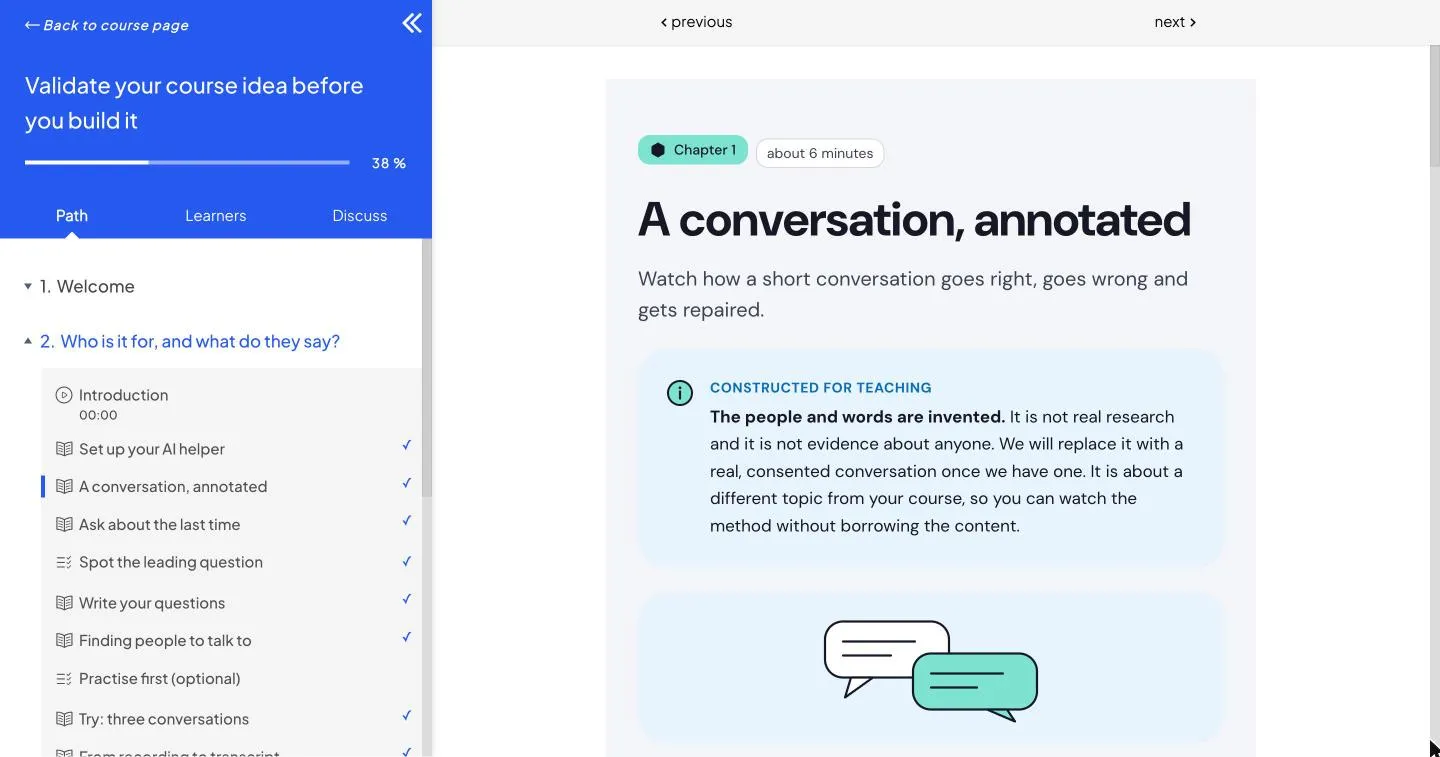
An ebook lesson in the course player, from a course on our test school. The path on the left shows each section, lesson type and what the learner has finished.
Interactive video
LearnWorlds hosts your video and lets you add to it. On Pro Trainer you can add text, images, a video summary written by AI, and subtitles from an .srt file. On Learning Center you can also add questions, buttons and chapters inside the video. It also generates subtitles automatically (6 hours a month) and AI can suggest questions.
Questions inside a video stop learners watching passively. For a compliance or skills course, that’s the difference between a video someone left running and one they had to think about.
In client courses that use interactive video well, we’ve seen engagement and completion rates go up.
Assessments and exams
LearnWorlds has a full assessment builder for different types of quizzes, from ungraded self-assessments to graded exams. Graded exams can have a timer, questions drawn at random from a question bank, several attempts, a pass mark and detailed feedback. You can import questions from a spreadsheet. On Pro Trainer and above, learners can upload a file as an assignment, and Learning Center adds video and audio responses. Written and file answers wait in a review queue for you to mark.
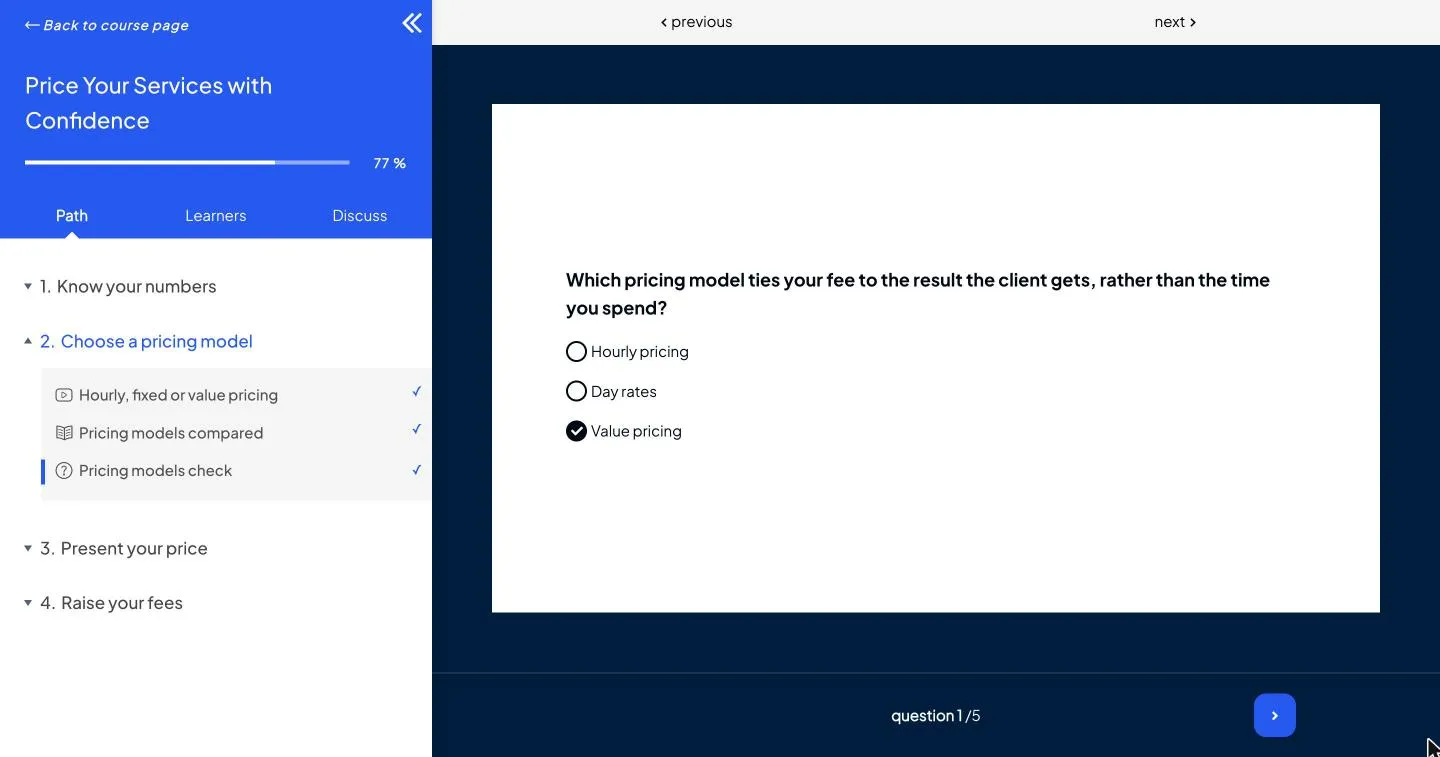
A graded check inside the course player, from a demo course on our test school. This one has five questions and a 70% pass mark.
Certificates for CPD and compliance
There are two kinds of certificate. A Certificate of Completion is issued when a learner meets the course requirements. A Certificate of Knowledge needs a pass on a graded exam. Certificates start on Pro Trainer, which also connects to Accredible and Credly for digital credentials.
LearnWorlds issues the certificate; accreditation itself comes from your CPD or awarding body. If you run a programme of several courses, you can add a certificate at the end of a learning path.
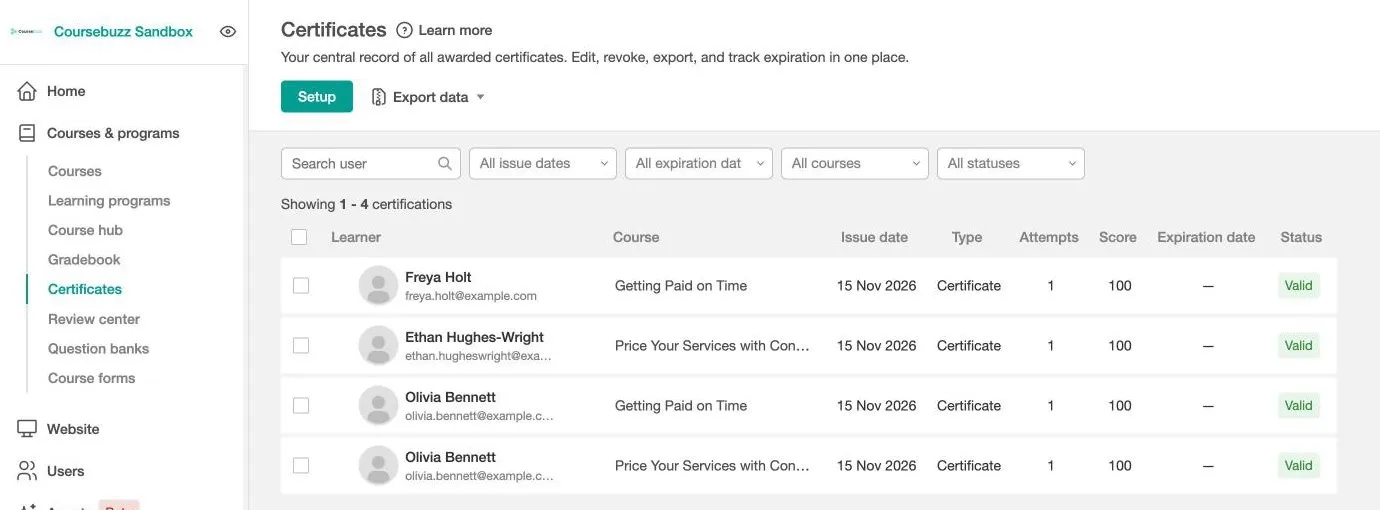
The certificates register on our test school (the learners are invented). You can filter by date, course and status, track expiry and export the list, which is the record a CPD or compliance audit asks for.
SCORM support
SCORM is the standard format most e-learning authoring tools export to. LearnWorlds plays SCORM packages inside the course player and can grade them. Pro Trainer allows 20 packages (2 GB in total), and Learning Center and above allow an unlimited number. Each file can be up to 400 MB.
Selling the way your buyers pay
On Pro Trainer and above, one course can have several pricing options. For example, a full price, a payment plan, a subscription and a members’ rate for people with a certain tag. You can also bundle courses into learning programs, run coupons and order bumps, and set up an affiliate programme. Pro Trainer and above charge no fee on each sale. Payments go through your own Stripe or PayPal account.
White-label and training for organisations
Every plan runs on your own domain. Learning Center adds full white-label, with no LearnWorlds logos. It also adds what you need when companies buy your training for their staff:
- user groups with managers who see their own people’s progress, useful for employee training
- single sign-on (SSO), so staff log in with their work accounts
- detailed reporting on learner progress, with course reports you can schedule and send
- two hours of onboarding help from a LearnWorlds specialist
- the API (application programming interface) and webhooks, for connecting your own systems
- automations built from triggers, conditions and delays
From building client schools, Learning Center gives you a full corporate-level LMS at a fixed cost.
AI and the LearnWorlds MCP
Every plan includes LearnWorlds AI, with a monthly allowance of AI credits. It can draft a course from your source files, write assessment questions, and build activities such as flashcards and sorting exercises inside ebooks.
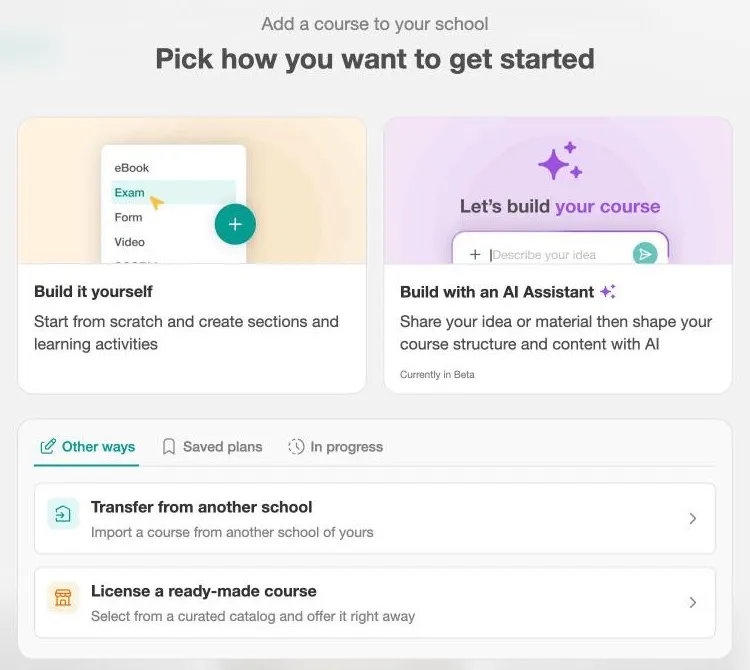
Starting a new course: build it yourself, or describe your idea and share your material with the AI Assistant (in beta at the time of writing).
Learning Center also includes the LearnWorlds MCP (Model Context Protocol), a connector that lets an AI assistant such as Claude work inside your school. You ask in a sentence, and it builds the course, enrols learners or pulls the numbers. We followed one course through its first week with it on a test school: how to connect LearnWorlds to Claude. Its automations and MCP pay for themselves once a school gets larger, or its pricing and packaging get more complex.
Website builder, landing pages and marketing tools
Every plan includes a website builder for your online school, with over 50 mobile-responsive templates you can edit. You build the home page, course pages and landing pages yourself, and add funnels, popups and a blog. There’s a built-in community for learners, coupons, order bumps and, from Pro Trainer, an affiliate programme so partners can sell your courses.
For a training business, it means the sales page, checkout and course live in one place. A learner who buys on your landing page goes straight into the course player. The sale and their progress are both recorded in your LearnWorlds admin.
Integrations, LearnWorlds support and the mobile app
Pro Trainer includes over 50 built-in integrations, including Zapier, Zoom, Microsoft Teams, and email tools such as Mailchimp and MailerLite. Starter has email support 24 hours a day, five days a week. Pro Trainer and above have 24/7 email support from the LearnWorlds support team.
A branded mobile app is a paid add-on from Pro Trainer. It puts your academy in the Apple and Google app stores under your own name, with offline video and push notifications.
Where LearnWorlds has gaps, and how we fill them
No platform does everything. These are gaps we’ve met on real client builds, with the fix we use.
The best features sit on the higher plans
Questions inside videos, automations, user groups, SSO, the API and full white-label all start on Learning Center. Certificates, SCORM and payment plans start on Pro Trainer.
Fix: plan from how you sell, not how big you are. Our pricing guide maps each feature to the plan it needs. Check which plan a feature belongs to during the free trial, so you don’t design around something you won’t have.
The Enroll button doesn’t follow your page design
On a course page, the Enroll button at the top is a system button with no click setting. On a school we built, it opened the separate payment page instead of the payment section placed lower on the same course page. That can leave a course with two checkouts, each with its own settings.
Fix: swap it for a normal button that scrolls to your payment section, and send enrolled learners from course cards straight into the course player.
Showing a section only to enrolled learners
In the site builder we’ve worked with, a section’s visibility setting offered all users, logged-out, logged-in, tagged users or nobody. There was no “enrolled” choice, although the support centre describes one.
Fix: show and hide sections by tag instead. Add the tag at checkout, in bulk from a spreadsheet, or through Zapier.
Course content stays on the platform
LearnWorlds has no one-click export of a course, and ebooks can’t be downloaded or exported.
Fix: keep your source files (scripts, slides, question banks) outside LearnWorlds as your master copy. If you build in an authoring tool, SCORM packages stay portable.
SCORM tracking is course-level
LearnWorlds records a SCORM package’s final score or pass and fail, not each section inside it.
Fix: if you need section-level results, split a long package into smaller ones, or rebuild key assessments in LearnWorlds’ own exam builder.
When there’s no setting for it: custom code and Claude
Most other gaps can be closed with some custom work. One of the best things about LearnWorlds is that you can embed almost anything inside it, and add your own code to the site so it works the way you need. Custom code is available on every plan.
With Claude, that kind of custom development is now within reach of any school owner, not only those with a developer. We’ve used it to build features for clients that either don’t exist in LearnWorlds or don’t quite fit what they need. If you’d like to learn to do this yourself, see Claude for course businesses.
LearnWorlds pricing in brief
Prices are in US dollars per month, exclude VAT, and are the standard prices on the LearnWorlds pricing page in November 2026.
| Plan | Billed annually | Billed monthly | Best for |
|---|---|---|---|
| Starter | $44 | $49 | Testing one paid course ($5 per enrolment) |
| Pro Trainer | $79 | $99 | Most training businesses |
| Learning Center | $249 | $299 | Branded academies and selling to organisations |
| Corporate | Custom quote | Custom quote | Over 2,000 active learners a month |
Most of our clients start on Pro Trainer while they’re building. Master the smaller feature set, test your ideas, then upgrade when you outgrow it. If you know organisations will be adding hundreds of their staff from day one, launch on Learning Center.
The full LearnWorlds pricing guide covers the limits, the fees on top and when each plan pays for itself.
Is LearnWorlds worth it?
For a training business selling professional education, LearnWorlds is worth it when you use what you pay for. Pro Trainer gives you certificates, SCORM, payment plans and no fee on each sale in one subscription. Compare that with the cost of the separate tools you’d otherwise pay for and connect yourself.
Learning Center is worth it once organisations buy from you. User groups, SSO, scheduled reports and automations are the features corporate buyers ask about, and they come at a fixed monthly price.
It’s harder to justify if you’ll only ever sell one simple course, or if you want a marketplace to bring the buyers.
LearnWorlds can deliver almost any kind of learning experience you can think of. To make it pay, you need a clear idea of who you’re designing for and what they want from you. That’s what tells you which courses and services people and organisations will pay for.
How to test LearnWorlds before you commit
The free trial lasts 30 days and gives access to the core features. Use it to build one real course rather than clicking around:
- Set up the course page and the course player with one real lesson.
- Add a short graded quiz and a certificate.
- Add your price, connect Stripe or PayPal, and buy the course yourself.
- Log in as a learner and complete it on your phone.
You’ll learn more from that one purchase than from any review, this one included.
Start your 30-day LearnWorlds free trial (affiliate link)
LearnWorlds review FAQ
Is LearnWorlds any good? Yes, for selling professional training under your own brand. Its course player, assessments, certificates and SCORM support suit CPD and certified courses. The main trade-off is that several key features need Pro Trainer or Learning Center.
What is LearnWorlds used for? Building, selling and running online courses on your own website. Training providers use it to sell to individuals, and to give organisations access for their staff.
Is LearnWorlds an LMS? Yes. LearnWorlds is a learning management system with a website builder, checkout and marketing tools built in.
Does LearnWorlds take a cut of my sales? Starter charges $5 per course enrolment. Pro Trainer and above charge no fee on each sale. Stripe or PayPal charge their own processing fees.
Can I issue CPD certificates on LearnWorlds? Yes, from Pro Trainer upwards. LearnWorlds issues the certificate when a learner completes the course or passes an exam. Accreditation comes from your CPD body.
Can I upload SCORM courses to LearnWorlds? Yes, from Pro Trainer. Pro Trainer allows 20 SCORM packages and Learning Center allows an unlimited number, up to 400 MB per file.
Is there a free plan? No, but every plan has a 30-day free trial.
Can I move my courses from Kajabi, Thinkific or Teachable? LearnWorlds offers a free migration consultation, and done-for-you migration on request. It lists Kajabi, Thinkific, Teachable, Podia, Moodle, LearnDash and WordPress among the platforms it moves courses, learners, certificates and subscriptions from.
Would we recommend LearnWorlds? Yes, for serious course creators and training providers building a professional education business. It’s the platform we chose to build on in 2022, and we’d recommend it to anyone who needs assessments, certificates and a branded academy in one place. For a single short course with no plans to grow, try a simpler tool first.
Is LearnWorlds hard to learn? The course builder and AI make a first course quicker to draft. The website builder, checkout and plan settings have many options, so expect a learning curve.
The short version
LearnWorlds is a strong choice for experts and training providers who sell professional education and care how the learning looks and works. Start on Pro Trainer for certificates, SCORM and payment plans. Move to Learning Center when organisations buy from you, or when you need full white-label, automations and the MCP. Each gap above has a workaround, so check them against your plans before you build.
If you’d like a second opinion on whether LearnWorlds fits your academy, or help building it, book a free call with CourseBuzz.
Features and prices checked against the LearnWorlds pricing page, plans page and support centre, and our own build notes, in November 2026.